
Website Design & Development That Drives Results
Why Choose Ambrose Marketing for your website design needs?
We go beyond “pretty design.” Every site we create is:
Strategic: Built with your ideal audience in mind, focusing on engagement and usability.
Optimized: With on-page SEO that helps your site reach and grow its audience.
Adaptable: Options for ongoing maintenance mean your site stays fresh and up-to-date.


A Beautiful Website Isn’t Enough. It Needs to Drive Results
At Ambrose Marketing, we build custom websites designed to attract, convert, and grow. Our websites combine high-end design with strategic on-page SEO, responsive functionality, and long-term scalability, so your site becomes a powerful revenue-generating tool, not just a digital placeholder.
Whether you're launching a new brand or refreshing an outdated site, we create SEO-friendly websites that evolve with your business and help you show up for the searches that matter.


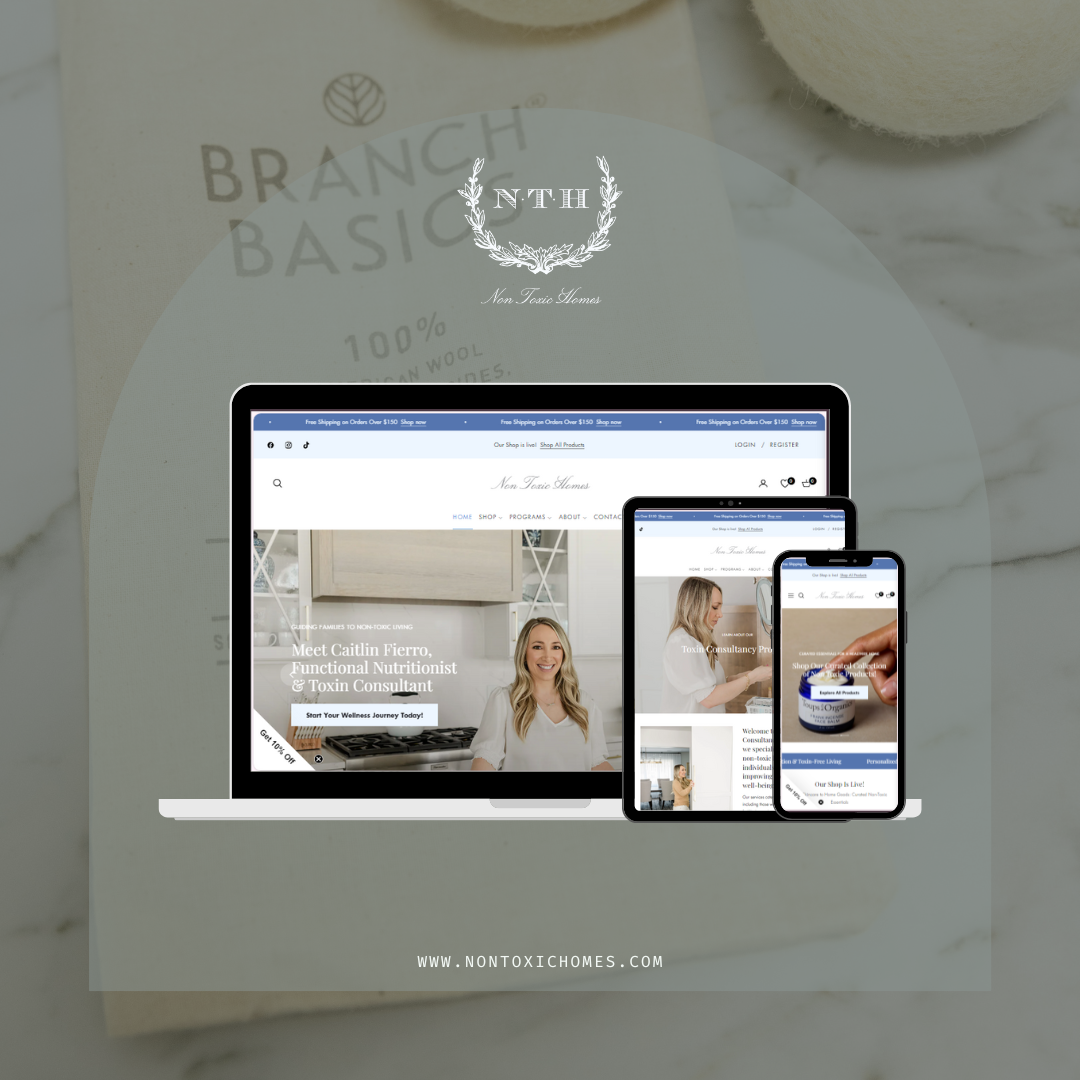

PLATFORMS WE WORK WITH
We bring expertise across a range of platforms, creating custom sites that fit your business needs -
Shopify
WordPress
Squarespace
Showit

READY TO MAKE AN IMPACT?
Book a free consultation call & let’s explore ways we can help your business grow.
Custom Website Design That Works Beautifully and Converts Seamlessly
At Ambrose Marketing, we design custom websites that go beyond aesthetics. They drive results. Whether you’re a service-based business, wellness brand, real estate agency, or ecommerce store, your website should do more than look good. It should educate, engage, and convert your audience effortlessly.
Website Design & Development Services:
Custom Website Design
Tailored to your brand’s story, audience, and goals. We use platforms like Webflow, Shopify, and WordPress to match function with beauty.
UX & Mobile Optimization
We prioritize clean user journeys, fast loading speeds, and fully mobile-responsive layouts to ensure a seamless experience on any device.
SEO Foundations Built In
Our websites launch with on-page SEO, optimized structure, meta data, and best practices baked in, giving you a strong head start on search.
Conversion Strategy
Every page is designed to drive a specific action, from booking a consult to making a purchase. Strategic CTAs, lead flows, and layout hierarchy guide your visitors toward action.
Platform Support
Specializing in Shopify, WordPress, and Webflow. Whether it’s ecommerce or service-based, we build on what makes the most sense for your needs.
Serving Clients in:
Manhattan, NY Website Design
Charleston, SC Website Design
Naples, FL Website Design
Why Ambrose for Web Design?
Because your site should be more than a brochure. It should reflect your brand, tell your story, and drive results, without sacrificing elegance or usability. With every site we design, we bring strategy, clarity, and long-term vision to the table.
Let’s Build a Website That Works for You
Book a discovery call today to bring your next digital home to life.


HOW WE MEASURE
What we measure after every launch:
Conversion rates: inquiries, bookings, and sales tracked against your previous site, so you can see what the redesign changed.
Load times: Core Web Vitals checked on real phones before and after launch, so pages feel fast and stay stable.
Engagement: how visitors move through the site and where they drop off, so we know what to improve next.
Beautiful, Fast, Accessible, and Findable
A website is often the first real conversation a client has with your brand. It has to look like you, load quickly on a phone, work for every visitor, and be easy for search engines and AI tools to understand. Here is what the standards bodies and platforms say matters.
Your phone version is the real version
Google uses the mobile version of a site, crawled with its smartphone agent, for indexing and ranking, and advises making sure the mobile site contains the same content as the desktop site (Google). We design mobile layouts first, then expand to larger screens.
Speed and stability are measured
Core Web Vitals measure loading, responsiveness, and visual stability. To pass, a page should show its main content (Largest Contentful Paint) in 2.5 seconds or faster, react to taps (Interaction to Next Paint) in 200 milliseconds or faster, and keep layout movement (Cumulative Layout Shift) at 0.1 or lower (web.dev).
Page experience counts, but relevance comes first
Google says Core Web Vitals are used by its ranking systems, yet good scores do not guarantee top rankings, and it will still show the most relevant content even when page experience is weaker (Google). That is why we pair performance work with genuinely useful pages.
Accessibility is part of serving the public
The Department of Justice says the ADA applies to the goods and services businesses offer on the web, and points to WCAG and Section 508 as helpful standards, while leaving businesses flexibility in how they make their sites accessible (DOJ).
Website Design and Development Services
Every project is built around what you need visitors to do next, whether that is booking a consultation, calling, or checking out.
Strategy and sitemap
Before any design, we map your services, audiences, and the questions buyers ask, then plan pages so each one has a clear purpose and nothing important is buried three clicks deep. We also note which pages already earn search traffic, so the new structure protects them.
Custom visual design
Layouts, typography, color, and photography direction drawn from your brand identity, designed to feel considered on a large monitor and effortless on a phone.
Development on the right platform
We build on platforms such as Shopify, Squarespace, and WordPress, choosing based on how you sell, who will update the site, and what you need it to do in three years, not just at launch.
Ecommerce builds
Product pages, collections, filters, and checkout flows that make buying simple, with clean product data that also supports Google Shopping and ads.
Copywriting
Headlines and page copy written in your voice, clear about who you help and what happens next, and structured with headings that both readers and search engines can follow.
SEO foundations
Clean URLs, titles, meta descriptions, heading structure, internal links, structured data, image alt text, and an XML sitemap set up before launch, so search engines understand the site from day one.
Accessibility review
Color contrast, keyboard navigation, focus states, form labels, and text alternatives checked against WCAG 2.2 success criteria during design and again before launch.
Performance tuning
Compressed modern image formats, careful font loading, and fewer heavy scripts, measured against Core Web Vitals instead of a gut feeling.
Care after launch
Ongoing updates, seasonal refreshes, platform updates, and monitoring, so the site keeps working and stays current after the launch excitement fades.
The WCAG Details We Build In
WCAG 2.2, published by the W3C in October 2023, organizes its guidance under four principles: perceivable, operable, understandable, and robust, with success criteria at levels A, AA, and AAA (W3C). These are a few of the criteria we check on every project. This is general information, not legal advice.
Text alternatives for images
WCAG 1.1.1 requires that non-text content presented to users has a text alternative that serves the equivalent purpose (W3C). Google also uses alt text to understand images, and warns against stuffing it with keywords (Google).
Readable contrast
At level AA, normal text needs a contrast ratio of at least 4.5:1 against its background, and large text at least 3:1 (W3C). Soft, elegant palettes can pass, but they have to be tested, not assumed.
Everything works from a keyboard
WCAG 2.1.1 requires that all functionality is operable through a keyboard interface (W3C). Menus, sliders, forms, and booking widgets get tested with the Tab key, not just a mouse.
Tap targets that fit a finger
New in WCAG 2.2, criterion 2.5.8 sets a minimum target size of 24 by 24 CSS pixels for pointer inputs, with some exceptions (W3C). Small icon links in headers and footers are common failures we fix.
Forms people can complete
Visible labels, helpful error messages, and no information lost when a mistake is corrected. Forms are where accessibility problems most often cost you real inquiries.
Third-party tools, checked
Booking systems, chat widgets, and embedded forms come from other companies, but they live on your site. We review them before recommending them and flag issues we cannot fix ourselves.
Our Website Design Process
A predictable process keeps projects on schedule and keeps surprises out of launch week.
1. Discovery
Goals, audiences, competitors, current analytics, and the content you already have. We also list every existing URL that earns traffic so nothing valuable is lost later.
2. Sitemap and wireframes
Page structure and layout decided in simple form first, so we agree on what goes where before time is spent on visual polish.
3. Design
Full visual designs for key pages on mobile and desktop, refined with your feedback in focused rounds.
4. Build and content
Development, copy, images, forms, integrations, structured data, and analytics, assembled on a staging site you can review.
5. Test
Speed, accessibility, links, forms, and devices checked before launch, including keyboard-only navigation and real phones.
6. Launch and redirects
When URLs change, each old address gets a permanent server-side redirect to its new home. Google recommends keeping redirects in place generally for at least a year (Google). We watch Search Console closely in the weeks after launch.
Why Some Beautiful Sites Feel Slow
Most slow brand sites are not slow because of the platform. They are slow because of a few avoidable choices. These are the ones we look for first.
An oversized hero image
The large image at the top of a page is often the Largest Contentful Paint element. web.dev recommends making it discoverable in the HTML, giving it high fetch priority, never lazy-loading it, and reducing its file size with compression and modern formats such as WebP and AVIF (web.dev).
Too many scripts
Chat widgets, pop-ups, tracking pixels, and review badges each add weight. We keep the ones that earn their place and load the rest only when needed. Each script is a small decision, but together they decide how fast the page feels.
Fonts that block the page
Several custom font families in many weights delay text from appearing. A tighter type system looks more intentional and loads faster.
Layouts that jump
Images and embeds without reserved space push content around as they load, which frustrates readers and hurts Cumulative Layout Shift. Setting dimensions fixes most of it.
Websites for Brands Like Yours
Different businesses need their websites to do different jobs. Here is how the priorities change for the industries we work with most.
- Med spas and aesthetics clinicsTreatment pages that explain who each service is for, what to expect, and who performs it, with online booking that works smoothly on a phone. Med spa marketing
- Wellness and nutrition practicesCalm, educational sites that build trust before asking for a booking, with clear credentials and careful language around results. Wellness marketing
- Ecommerce and product brandsFast product pages, clear photography, simple checkout, and product data ready for Google Shopping. Ecommerce marketing
- Law firms and professional servicesPractice area pages, attorney or advisor bios, and intake forms that respect the advertising rules in your profession. Law firm marketing
- Hospitality, events, and real estateImage-led layouts that still load fast, with availability, inquiry, and tour requests one tap away. Hospitality marketing
Want to see the work first? Browse our portfolio for brand and website projects across these industries.
What to Gather Before a Website Project
Projects move fastest when a few things are ready early. You do not need all of them on day one, but each one you have saves time later.
Access and accounts
Logins or delegated access for your current website, domain registrar, Google Analytics, Search Console, and any booking, email, or ecommerce tools that connect to the site.
Brand assets
Logo files, colors, fonts, and any brand guidelines. If they do not exist yet or feel dated, branding can happen before or alongside the website.
Photography and video
Real photos of your team, space, products, and work. Professional photography is one of the biggest upgrades a site can get, and stock images rarely build the same trust.
Your best questions
The questions clients ask on calls and in emails. They become page content, FAQs, and the clearest path to showing up when people search for answers.
Reviews and proof you can share
Testimonials you have permission to publish, press mentions, certifications, and licenses. Proof should be real, current, and representative.
A short list of sites you admire
Two or three websites you like, and what specifically you like about them. It is the fastest way to align on taste before design begins.
Website Design Questions, Answered
How much does a custom website cost?
Every website and branding project is quoted individually. The final investment depends on the number of pages, ecommerce needs, integrations, and copywriting, and we confirm scope in writing after a free consultation.
How long does a website project take?
Most service business sites take several weeks from discovery to launch, and larger ecommerce or content-heavy sites take longer. Timelines depend heavily on how quickly content and feedback come together, so we set a schedule together at the start.
Which platform should we use?
It depends on how you sell and who will maintain the site. Shopify is strong for ecommerce, Squarespace is simple for small teams to update, and WordPress offers the most flexibility for complex content. We recommend the platform that fits your business, not the one we prefer to build on.
Does our website need to be ADA accessible?
The Department of Justice says the ADA applies to services businesses offer on the web and points to WCAG as a helpful standard, while not mandating one specific technical standard for businesses (DOJ). We design toward WCAG 2.2 level AA. For legal questions, talk with your attorney.
Will a redesign hurt our search rankings?
It can if URLs change without redirects. We map every important page to its new address with permanent redirects, which Google recommends keeping for at least a year (Google), and monitor Search Console after launch.
What are Core Web Vitals?
Three Google metrics: how fast the main content appears (2.5 seconds or faster), how quickly the page reacts to a tap or click (200 milliseconds or faster), and how much the layout shifts while loading (0.1 or lower) (web.dev). Google says they are used by its ranking systems but do not guarantee top rankings (Google).
Do you design for mobile first?
Yes. Google indexes and ranks the mobile version of a site (Google), and many visitors arrive on a phone, so we design the mobile experience first and make sure no important content is missing from it.
Can you write the content for our site?
Yes. We write page copy in your brand voice, and we can work from your notes, recorded interviews, or existing materials. Clear copy is usually the biggest single improvement in how a site converts.
Can we update the site ourselves after launch?
Yes. We build on platforms your team can manage and walk you through common updates. If you would rather not, ongoing care and seasonal refreshes are available.
Do you redesign existing websites?
Yes. Many projects are redesigns. We keep what is working, including pages that already earn search traffic, and rebuild what is not.
Is Your Website Working as Hard as You Do?
In a free consultation we review your site on a phone, check speed and accessibility basics, and show you the first changes we would make.
Book a free consultation4850 Tamiami Trl N, Ste 330, Naples, FL 34103 · (917) 513-7221 · Daily, 9:00 AM to 5:00 PM
Sources
- U.S. Department of Justice, Guidance on Web Accessibility and the ADA (March 18, 2022). www.ada.gov
- W3C Web Accessibility Initiative, WCAG 2 Overview. www.w3.org
- W3C Web Accessibility Initiative, How to Meet WCAG 2.2 (Quick Reference). www.w3.org
- Google Search Central, Mobile site and mobile-first indexing best practices. developers.google.com
- Google Search Central, Understanding page experience in Google Search results. developers.google.com
- web.dev, Web Vitals. web.dev
- web.dev, Optimize Largest Contentful Paint. web.dev
- Google Search Central, Google Images SEO best practices. developers.google.com
- Google Search Central, Site moves with URL changes. developers.google.com